
Hex Grids Documentation
C++ plugin for hexagon grid systems in Unreal Engine
Getting Started
Installation
- 1. Add the plugin to your preferred engine version via the Unreal Launcher
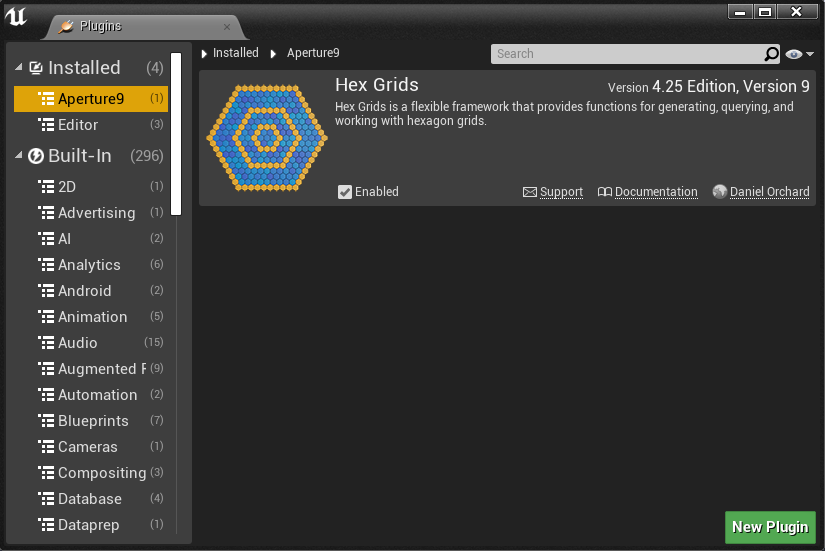
- 2. Open your Unreal project and navigate to Settings → Plugins
- 3. Find the HexGrids plugin in the Aperture9 category
- 4. Tick the enable box and restart your Unreal project
Accessing Plugin Content
Once your project has loaded, you need to enable plugin content visibility:
- 1. Navigate to the bottom right of your content browser
- 2. Open View Options
- 3. Tick "Show Engine Content" and "Show Plugin Content"
- 4. Scroll down to find the HexGrids Content folder
💡 Tip: Right-click the HexGrids folder and choose "Add to Favourites" for easy future access.
Example Maps
The plugin includes several example maps to demonstrate different use cases:
Demo Room
Contains a wide assortment of Hex Grid examples showing individual functions and complex setups such as AI-driven movement across the hex board. This should be your prime reference for learning how to use the available functions.
Multi Instance Example
Demonstrates a complex setup showing how to utilize multiple Instanced Static Meshes at once to build a single hex grid. This is the most performant method but requires advanced setup.
Overview
Shows the most basic usage with a Simple Hex Grid in default settings, plus patch notes for the grid updates.
Runtime Map Builder
Example of how to load and save Hex Grid Maps, plus enabling users/developers to create custom grid shapes at runtime.
Showcase
Highly animated grid demonstrating functions in action and ways to manipulate the grid itself. Great for animating grid loading or applying modifications to tiles.
Basic Usage
Adding Hex Grids to Your World
- 1. Navigate to the HexGrids/Blueprints folder in the plugin content
- 2. Use the general HexGrids blueprint as your starting point
- 3. Copy the blueprint to your project content folder for easy access
- 4. Drag and drop the HexGrid BP into your world
- 5. Adjust the details panel to get your desired grid shape and size
⚠️ Performance Tip: Type values instead of dragging sliders in the details panel, as construction script re-runs can become laggy with slider adjustments.
Core Blueprint Functions
Delete Grid
The first function in the chain. Cleans up the grid from any previous construction script runs. Very handy at runtime when modifying grid size - clean up the old grid and re-run the chain to make the grid fully modifiable at runtime.
Generate Grid
The core of grid generation. This generates the data grid, which is ultimately an array of coordinates. This de-couples the grid concept from the mesh side, so you don't even need meshes - you can work with it purely as a data-only grid and run grid logic with a single landscape as the floor.
Populate Grid
Generates the mesh to visualize the grid. Supports both Instanced Static Mesh and Static Mesh Components. You'll want to customize this function most for your own uses to control what meshes are generated and what they do.
💡 Blueprint Tip: You can swap out the AddStaticMesh approach for SpawnActorFromClass to spawn blueprint actors for each tile (requires moving PopulateGrid to BeginPlay).
Static Meshes vs Instanced Static Mesh
Choosing Your Approach
When using meshes for your tiles, you need to decide between Static Mesh Components and Instanced Static Mesh Components (ISM).
✅ ISM Benefits
- • Super cheap to render
- • Grid can be 10x larger than normal mesh grids
- • Excellent memory efficiency
- • Perfect for mobile development
- • Ideal for large grids
❌ ISM Limitations
- • Copy of a single mesh only
- • Cannot use different tile designs
- • More suited for grid visualization
- • Artwork placed separately on top
ISM Meta (UE 4.24+)
New in UE 4.24/4.25 is the concept of adding meta tags to your ISMs. This empowers you to make ISMs more unique in material design, adding some customization possibilities to the performant ISM approach.
Need Help?
For additional support, questions, or feature requests, don't hesitate to get in touch.
Contact Support